
在Android开发中,创建XML文件是一个重要的步骤。XML文件用于定义应用程序的用户界面和布局。通过使用XML,开发者可以设计出美观且易于使用的界面。本文将介绍如何在Android项目中创建XML文件,并提供一些常用的XML标签和属性的示例。无论是初学者还是有经验的开发者,都可以从中获得有用的信息和技巧。
在Android中创建XML文件,通常需要以下步骤:
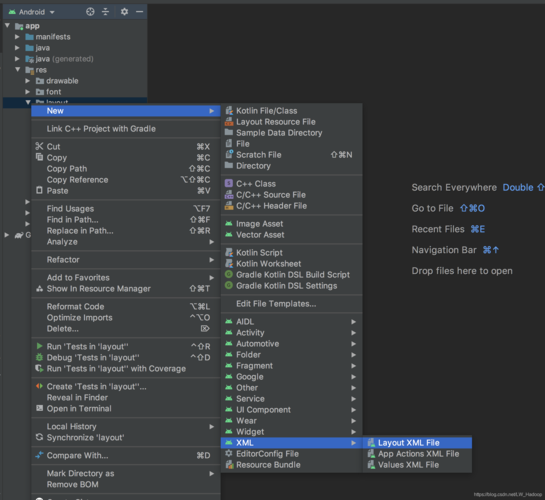

1、创建一个新的XML文件
2、在文件中定义元素和属性
3、使用布局编辑器预览和调试你的布局
4、将XML文件添加到你的项目中
下面是一个简单的例子,我们将创建一个名为activity_main.xml的XML文件,它将定义一个包含标题和表格的布局。
<?xml version="1.0" encoding="utf8"?>
<LinearLayout xmlns:android="http://schemas.android.com/apk/res/android"
    android:layout_width="match_parent"
    android:layout_height="match_parent"
    android:orientation="vertical">
    <TextView
        android:id="@+id/title"
        android:layout_width="wrap_content"
        android:layout_height="wrap_content"
        android:text="My Title"
        android:textSize="24sp" />
    <TableLayout
        android:id="@+id/table"
        android:layout_width="match_parent"
        android:layout_height="wrap_content"
        android:stretchColumns="*">
        <TableRow>
            <TextView
                android:layout_width="0dp"
                android:layout_height="wrap_content"
                android:layout_weight="1"
                android:text="Header 1" />
            <TextView
                android:layout_width="0dp"
                android:layout_height="wrap_content"
                android:layout_weight="1"
                android:text="Header 2" />
        </TableRow>
        <TableRow>
            <TextView
                android:layout_width="0dp"
                android:layout_height="wrap_content"
                android:layout_weight="1"
                android:text="Item 1" />
            <TextView
                android:layout_width="0dp"
                android:layout_height="wrap_content"
                android:layout_weight="1"
                android:text="Item 2" />
        </TableRow>
    </TableLayout>
</LinearLayout> 在这个例子中,我们首先创建了一个垂直的LinearLayout,然后添加了一个TextView,接着添加了一个TableLayout来显示表格,在TableLayout中,我们添加了两个TableRow,每个TableRow中又有两个TextView,分别表示表格的两列。
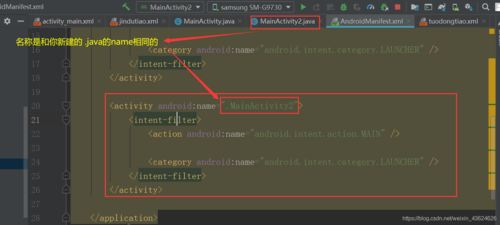
下面是一个关于Android中创建XML文件的基础知识介绍,主要涉及布局(Layout)XML文件的创建:
android:layout_widthandroid:layout_heightandroid:layout_width相同android:orientationandroid:layout_marginandroid:layout_paddingandroid:layout_gravityandroid:gravityandroid:idandroid:layout_belowandroid:layout_aboveandroid:layout_toLeftOfandroid:layout_toRightOfandroid:layout_alignBaselineandroid:layout_centerInParentandroid:stretchColumnsandroid:shrinkColumnsandroid:layout_columnandroid:layout_span这是一个基本的概述,具体的XML布局文件可能会根据不同的布局类型和需求包含不同的属性和元素,在Android开发中,XML文件用于定义用户界面元素和布局,是界面设计与逻辑代码分离的重要部分。
本文来源于互联网,如若侵权,请联系管理员删除,本文链接:https://www.9969.net/9990.html
