
Android计算器代码
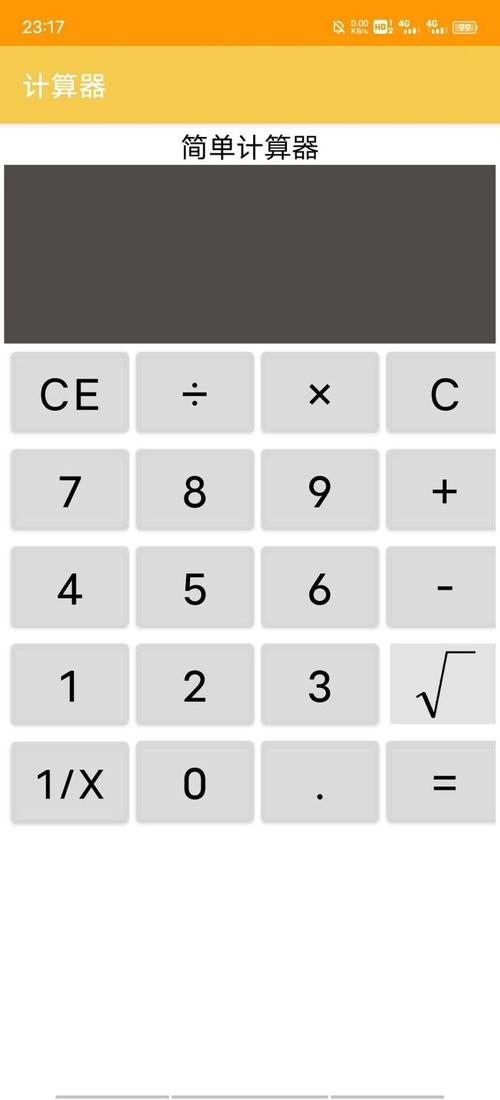

Android计算器是一个简单的应用程序,用于执行基本的数学运算,在本文中,我们将介绍如何编写一个简单的Android计算器应用程序,我们需要创建一个Android项目,并在其中添加必要的组件。
1. 创建Android项目
我们需要创建一个新的Android项目,在Android Studio中,选择"File" > "New" > "New Project",按照向导的提示,填写项目的基本信息,如项目名称、公司域名等,接下来,选择"Phone and Tablet"作为目标设备,并选择最低支持的API级别,选择"Empty Activity"作为初始活动模板,并点击"Finish"按钮完成项目的创建。
2. 设计布局
接下来,我们需要设计计算器的布局,打开项目中的activity_main.xml文件,并使用以下XML代码创建一个简单的计算器布局:
<LinearLayout
    xmlns:android="http://schemas.android.com/apk/res/android"
    android:layout_width="match_parent"
    android:layout_height="match_parent"
    android:orientation="vertical">
    <EditText
        android:id="@+id/input"
        android:layout_width="match_parent"
        android:layout_height="wrap_content"
        android:inputType="text"/>
    <TableLayout
        android:layout_width="match_parent"
        android:layout_height="wrap_content"
        android:stretchColumns="*">
        <TableRow>
            <Button
                android:text="7"
                android:id="@+id/button7"
                android:layout_width="0dp"
                android:layout_height="wrap_content"
                android:layout_weight="1"/>
            <!更多按钮 >
        </TableRow>
        <!更多行 >
    </TableLayout>
    <Button
        android:id="@+id/clear"
        android:layout_width="match_parent"
        android:layout_height="wrap_content"
        android:text="C"/>
    <Button
        android:id="@+id/equal"
        android:layout_width="match_parent"
        android:layout_height="wrap_content"
        android:text="="/>
</LinearLayout>
这个布局包含一个EditText用于显示输入和结果,一个TableLayout用于排列数字和操作按钮,以及两个额外的按钮用于清除和计算结果。
3. 编写逻辑代码
接下来,我们需要编写逻辑代码来处理用户的输入和计算结果,打开项目中的MainActivity.java文件,并覆盖onCreate()方法,如下所示:
@Override
protected void onCreate(Bundle savedInstanceState) {
    super.onCreate(savedInstanceState);
    setContentView(R.layout.activity_main);
    final EditText input = findViewById(R.id.input);
    final Button button7 = findViewById(R.id.button7);
    // 更多按钮的初始化
    button7.setOnClickListener(new View.OnClickListener() {
        @Override
        public void onClick(View v) {
            input.append("7");
        }
    });
    // 更多按钮的点击事件处理
    findViewById(R.id.clear).setOnClickListener(new View.OnClickListener() {
        @Override
        public void onClick(View v) {
            input.setText("");
        }
    });
    findViewById(R.id.equal).setOnClickListener(new View.OnClickListener() {
        @Override
        public void onClick(View v) {
            try {
                String expression = input.getText().toString();
                double result = eval(expression);
                input.setText(String.valueOf(result));
            } catch (Exception e) {
                input.setText("错误");
            }
        }
    });
}
public double eval(final String expression) {
    // 实现表达式求值的逻辑
}
在这个代码中,我们首先通过findViewById()方法获取布局中的组件,并为每个按钮设置点击事件监听器,当用户点击数字按钮时,将相应的数字添加到输入框中,当用户点击清除按钮时,清空输入框的内容,当用户点击等号按钮时,尝试计算输入框中的表达式,并将结果显示在输入框中,如果发生错误,将输入框的内容设置为"错误"。
4. 实现表达式求值
我们需要实现eval()方法来计算输入框中的表达式,这可以通过使用现有的表达式求值库或手动解析表达式来实现,以下是一个简单的示例实现:
public double eval(final String expression) {
    return new Object() {
        int pos = 1, ch;
        void nextChar() {
            ch = (++pos < expression.length()) ? expression.charAt(pos) : 1;
        }
        boolean eat(int charToEat) {
            while (ch == ' ') nextChar();
            if (ch == charToEat) {
                nextChar();
                return true;
            }
            return false;
        }
        double parse() {
            nextChar();
            double x = parseExpression();
            if (pos < expression.length()) throw new RuntimeException("Unexpected: " + (char)ch);
            return x;
        }
        double parseExpression() {
            double x = parseTerm();
            for (;;) {
                if      (eat('+')) x += parseTerm(); // addition
                else if (eat('')) x = parseTerm(); // subtraction
                else return x;
            }
        }
        double parseTerm() {
            double x = parseFactor();
            for (;;) {
                if      (eat('*')) x *= parseFactor(); // multiplication
                else if (eat('/')) x /= parseFactor(); // division
                else return x;
            }
        }
        double parseFactor() {
            if (eat('+')) return parseFactor(); // unary plus
            if (eat('')) return parseFactor(); // unary minus
            double x;
            int startPos = this.pos;
            if (eat('(')) { // parentheses
                x = parseExpression();
                eat(')');
            } else if ((ch >= '0' && ch <= '9') || ch == '.') { // numbers
                while ((ch >= '0' && ch <= '9') || ch == '.') nextChar();
                x = Double.parseDouble(expression.substring(startPos, this.pos));
            } else if (ch >= 'a' && ch <= 'z') { // functions
                while (ch >= 'a' && ch <= 'z') nextChar();
                String func = expression.substring(startPos, this.pos);
                x = parseFactor();
                if (func.equals("sqrt")) x = Math.sqrt(x);
                else throw new RuntimeException("Unknown function: " + func);
            } else {
                throw new RuntimeException("Unexpected: " + (char)ch);
            }
            if (eat('^')) x = Math.pow(x, parseFactor()); // exponentiation
            return x;
        }
    }.parse();
}
这个eval()方法实现了一个简单的递归下降解析器,用于解析输入的表达式并进行计算,它支持加法、减法、乘法、除法、指数运算和函数调用(如平方根)。
本文来源于互联网,如若侵权,请联系管理员删除,本文链接:https://www.9969.net/7034.html
