
要在PHP中开启,您需要编辑Apache的配置文件(通常是httpd.conf或apache2.conf),在其中添加新的指令。每个定义应包括域名、文档根目录和日志文件路径。配置后,重启Apache服务以应用更改。
在PHP中,是通过配置Apache或其他Web服务器来实现的,以下是使用Apache和PHP来设置的基本步骤:
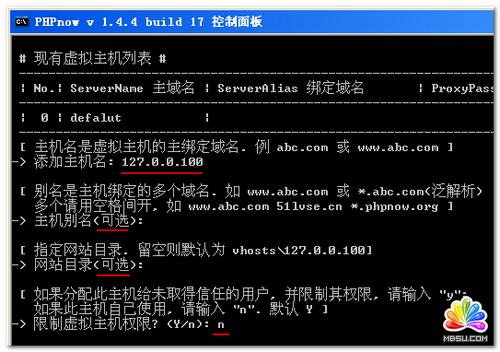

1、安装Apache和PHP
你需要在你的服务器上安装Apache和PHP,你可以使用包管理器(如aptget或yum)来安装它们。
2、创建配置文件
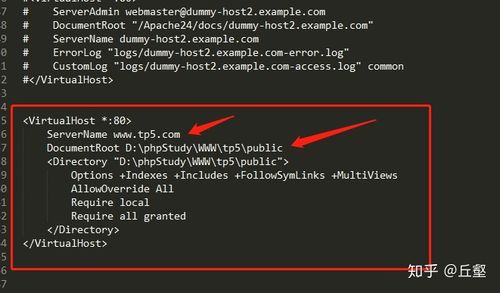
你需要为你的创建一个配置文件,这个文件通常位于/etc/apache2/sitesavailable/目录下,在这个文件中,你可以定义的各种设置,如文档根目录、错误日志等。
3、启用
创建完配置文件后,你需要启用它,这可以通过运行a2ensite命令来完成。
4、重启Apache
你需要重启Apache以使更改生效,这可以通过运行service apache2 restart命令来完成。
以下是一个简单的配置文件的例子:
<VirtualHost *:80>
    ServerAdmin webmaster@localhost
    DocumentRoot /var/www/mywebsite
    ErrorLog ${APACHE_LOG_DIR}/error.log
    CustomLog ${APACHE_LOG_DIR}/access.log combined
</VirtualHost>
在这个例子中,我们定义了一个监听80端口的,服务器管理员的电子邮件地址是webmaster@localhost,文档根目录是/var/www/mywebsite,错误日志和访问日志分别存储在/var/log/apache2/error.log和/var/log/apache2/access.log中。
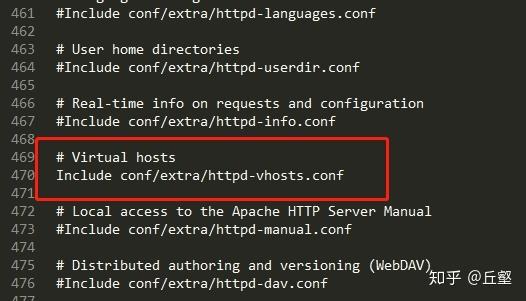
下面是一个简单的介绍,展示了如何在不同的操作系统和Web服务器上开启PHP的配置步骤:
/etc/httpd/conf/httpd.conf 或/etc/apache2/apache2.confC:Program Files (x86)Apache GroupApacheconfhttpd.conf 或在配置文件中/etc/nginx/nginx.conf 或在的配置文件中,通常位于/etc/nginx/sitesavailable/下面是针对不同服务器的配置示例:
Apache
Linux
打开httpd.conf 或 apache2.conf
<VirtualHost *:80>
    ServerAdmin webmaster@dummyhost.example.com
    DocumentRoot /var/www/html
    ServerName dummyhost.example.com
    ServerAlias www.dummyhost.example.com
    ErrorLog ${APACHE_LOG_DIR}/error.log
    CustomLog ${APACHE_LOG_DIR}/access.log combined
    # 开启PHP支持
    AddType application/xhttpdphp .php
    PHPIniDir "/etc/php/7.x/apache2" # 根据你的PHP版本和配置更改路径
</VirtualHost>
Windows
打开httpd.conf
<VirtualHost *:80>
    ServerAdmin webmaster@dummyhost.example.com
    DocumentRoot "C:wwwdummyhost"
    ServerName dummyhost.example.com
    ServerAlias www.dummyhost.example.com
    ErrorLog "logs/dummyhosterror.log"
    CustomLog "logs/dummyhostaccess.log" combined
    # 开启PHP支持
    AddType application/xhttpdphp .php
    PHPIniDir "C:php" # 根据你的PHP安装路径更改
</VirtualHost>
Nginx
Linux
打开配置文件
server {
    listen 80;
    server_name dummyhost.example.com www.dummyhost.example.com;
    root /var/www/html;
    index index.php index.html index.htm;
    location / {
        try_files $uri $uri/ =404;
    }
    # PHP 处理
    location ~ .php$ {
        include snippets/fastcgiphp.conf;
        fastcgi_pass unix:/var/run/php/php7.xfpm.sock; # 根据你的PHPFPM版本和配置更改
    }
}
请根据你的实际环境替换示例中的路径、文件名和服务器配置。
记得在修改配置文件后重启Web服务器使更改生效。
Apache:service httpd restart 或systemctl restart apache2
Nginx:service nginx restart 或systemctl restart nginx
本文来源于互联网,如若侵权,请联系管理员删除,本文链接:https://www.9969.net/11216.html
